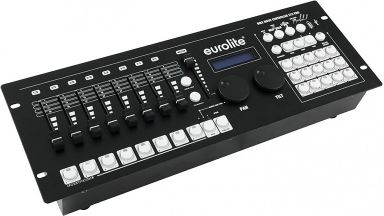
DMX control consoles
DMX Controllers – Professional Light Control Made Easy
Whether you're lighting a festival stage, a club night, or a corporate event – a professional DMX controller is the command centre of your lighting setup. DMX controllers allow you to coordinate moving heads, LED bars, fog machines, and effect devices with precision, creating impressive light shows that enhance every performance. At LTT, you'll find DMX controllers from leading manufacturers like Cameo, Eurolite, Showtec, and Chauvet DJ – from compact 6-channel units for mobile DJs to professional 512-channel consoles for complex stage productions. With intuitive operation, programmable scenes, and robust build quality, these controllers deliver the control you need to set the stage perfectly.
What Does DMX Stand For and How Does It Work?
DMX stands for Digital Multiplex and refers specifically to the DMX512 protocol – the industry standard for controlling lighting equipment in event technology. The number 512 indicates the maximum number of control channels available within a single DMX universe. Each channel transmits a digital value from 0 to 255, allowing precise control of parameters such as brightness, colour, position, and speed.
The DMX512 protocol transmits data serially over a dedicated cable, typically using 3-pin or 5-pin XLR connectors. While 3-pin XLR cables are commonly used and functionally adequate for most setups, professional DMX cables with 5-pin XLR connectors and a 110-ohm impedance are the official standard, ensuring reliable signal transmission even over longer cable runs.
How DMX Addressing Works
Every DMX-capable fixture in your lighting rig must be assigned a unique start address. A simple RGB LED bar might occupy three consecutive channels (one each for red, green, and blue), while a sophisticated moving head can require 16 or more channels to control pan, tilt, colour mixing, gobo selection, focus, prism effects, and strobe functions. By assigning different start addresses, you can control each fixture independently. Conversely, assigning the same start address to multiple fixtures makes them operate in perfect synchronisation – ideal for creating uniform colour washes or coordinated effects.
DMX controllers send continuous streams of data down the signal chain. You connect the controller's DMX output to the first fixture's DMX input, then daisy-chain subsequent fixtures by connecting each output to the next input. Up to 32 devices can be reliably connected per DMX line. At the end of the chain, it's best practice to install a DMX terminator – a simple plug with a 120-ohm resistor – to prevent signal reflections that can cause flickering or erratic behaviour.
Why DMX Remains the Industry Standard
Despite the emergence of wireless DMX systems and network-based protocols like Art-Net and sACN, wired DMX512 remains the backbone of professional event lighting. Its simplicity, reliability, and near-universal compatibility make it the go-to choice for lighting technicians worldwide. Whether you're controlling a handful of LED bars or orchestrating a complex rig with dozens of moving heads, DMX provides the robust, real-time control that live events demand.
Applications – Where DMX Controllers Shine
DMX controllers are indispensable across the full spectrum of event technology. Mobile DJs and entertainers rely on compact controllers to create dynamic lighting that responds to the music, enhancing dance floors at weddings, birthday parties, and club nights. A simple 6-channel or 12-channel controller is often sufficient to manage a few LED bars and a couple of flower effects, providing colour changes and automated programs without overwhelming complexity.
Bands and live music venues step up to mid-range controllers with 192 to 512 channels, enabling more sophisticated programming. These consoles allow lighting operators to create scene presets for different songs, trigger chases and effects in time with the music, and manually adjust intensity and colour during performances. The ability to store and recall scenes instantly is crucial when the setlist changes or improvisation is required.
Theatre productions and corporate events demand the highest level of control. Professional lighting designers use advanced DMX consoles with multiple universes (1024+ channels), motorised faders, touchscreen interfaces, and extensive cueing capabilities. These systems integrate seamlessly with moving heads, LED wash lights, fog machines, and even pyrotechnic effects, allowing designers to craft intricate lighting narratives that support the storytelling on stage.
Integration with Effect Devices
Beyond conventional lighting fixtures, DMX controllers also manage fog machines, hazers, and pyrotechnic devices. Many modern fog machines accept DMX input, allowing you to trigger bursts of fog or adjust output volume remotely from your console. This integration is essential for creating atmospheric effects that are perfectly timed with lighting cues – imagine a moving head beam cutting through a haze at the precise moment a song drops, or a coordinated fog burst synchronized with a pyrotechnic flash. LTT's extensive range includes DMX-compatible fog and haze machines from brands like Antari and Smoke Factory, ensuring seamless integration with your lighting control setup.
Choosing the Right DMX Controller – Channels, Features, and Brands
Selecting the right DMX controller depends on the size and complexity of your lighting rig, your budget, and your level of experience. Here are the key factors to consider:
Channel Capacity
The first question is: how many DMX channels do you need? Add up the channel requirements of all your fixtures. For example, four RGB LED bars (3 channels each) plus two moving heads (16 channels each) total 44 channels. It's wise to choose a controller with headroom for future expansion – a 192-channel or 256-channel console would be appropriate for this setup, leaving room to add more fixtures later.
For larger rigs, controllers offering 512 channels (one full DMX universe) or even 1024 channels (two universes) are available. Multi-universe controllers feature separate DMX outputs for each universe, allowing you to manage complex setups without overloading a single signal chain.
Controller Types and Form Factors
Compact controllers (6 to 54 channels) are ideal for mobile applications. They're lightweight, battery-powered or mains-operated, and feature simple fader-based interfaces. Brands like Cameo and Eurolite offer excellent entry-level models that are intuitive enough for beginners yet robust enough for regular use.
Mid-range consoles (192 to 512 channels) typically come in a 19-inch rack format or desktop housing. These units include programmable scene memory, chase sequencers, MIDI control inputs, and USB backup capabilities. They're the workhorses of the event industry, used by professional mobile DJs, small to medium venues, and rental companies. Showtec and Eurolite dominate this segment with reliable, feature-rich consoles.
Professional lighting desks (512+ channels, multiple universes) incorporate touchscreen displays, motorised faders, extensive fixture libraries, and advanced cueing engines. Brands like Chauvet DJ, Elation, and ChamSys offer consoles that rival broadcast-grade equipment, suitable for large-scale productions, touring shows, and permanent installations in theatres and concert halls.
Key Features to Look For
- Scene memory: The ability to store and recall lighting scenes instantly is essential for live performance. Look for controllers offering at least 24 to 48 programmable scenes.
- Chase programming: Chases are sequences of scenes that play back automatically, creating dynamic effects. Controllers with adjustable speed and fade times give you creative flexibility.
- Sound activation: Many controllers include a built-in microphone or audio input, allowing the lights to respond to music automatically – perfect for DJ sets and parties.
- USB backup: High-end consoles allow you to save your programming to a USB stick, protecting your work and enabling you to transfer shows between venues.
- Fixture library: Advanced consoles come pre-loaded with profiles for popular fixtures, simplifying setup and programming.
Trusted Brands at LTT
At LTT, we stock DMX controllers from manufacturers renowned for quality and reliability. Cameo offers excellent value for money with user-friendly designs perfect for mobile entertainers. Eurolite provides a broad range from basic controllers to professional consoles, all built to withstand the rigours of touring. Showtec and Chauvet DJ deliver feature-packed mid-range and professional units favoured by lighting designers and rental companies. For cutting-edge technology and extensive fixture support, Elation and ChamSys represent the pinnacle of lighting control.
Whether you're investing in your first controller or upgrading to a professional console, LTT's expert team can guide you to the optimal solution for your specific needs and budget.
Setting Up Your DMX Network – Cables, Addressing, and Termination
Proper DMX setup is critical for reliable operation. Even the best controller and fixtures will perform poorly if the signal chain is incorrectly configured. Here's how to build a robust DMX network:
DMX Cable Specifications
Always use proper DMX cables, not standard audio XLR cables. While they look identical, DMX cables are constructed with a 110-ohm impedance and twisted-pair wiring specifically designed for high-speed digital data transmission. Standard audio cables have a 75-ohm impedance and can cause signal degradation, especially over longer runs. Quality DMX cables from manufacturers like Sommer Cable, Neutrik, and Accu Cable ensure clean, interference-free signal transmission.
For most applications, 3-pin XLR DMX cables are perfectly adequate. The 5-pin standard offers additional functionality (such as a secondary data pair for future protocols), but the vast majority of fixtures use only the primary data pair carried by pins 1, 2, and 3.
Daisy-Chaining Your Fixtures
Connect your DMX controller's output to the DMX input of the first fixture. Then connect that fixture's DMX output (often labelled "DMX Out" or "DMX Thru") to the input of the next fixture, and so on. This serial connection forms a daisy chain. Avoid splitting the signal with Y-cables or passive splitters, as this can cause reflections and data corruption. If you need to distribute DMX to multiple branches, use an active DMX splitter or opto-isolator.
You can connect up to 32 fixtures per DMX line, though in practice, it's wise to stay below this limit to maintain signal integrity. For larger rigs, use a controller with multiple DMX outputs (multiple universes) or employ a DMX splitter to create additional signal paths.
DMX Addressing and DIP Switches
Each fixture must be assigned a DMX start address, typically configured via DIP switches or a digital menu on the fixture itself. Older fixtures use a bank of 9 or 10 DIP switches, where each switch represents a binary digit. To set address 1, all switches are off except switch 1. To set address 10, switches 2 and 4 are on (binary 1010 = decimal 10). Modern fixtures often feature a digital display and buttons, making addressing more intuitive.
Plan your addressing carefully. If you have four RGB LED bars, you might assign them addresses 1, 4, 7, and 10 (each occupying three channels). If you want them to operate in unison, assign them all to address 1 – they'll respond identically to the same control channels. Moving heads with 16-channel modes might start at addresses 13, 29, 45, and so on, ensuring no overlap.
DMX Termination
At the end of your DMX chain, install a DMX terminator. This is a simple XLR plug with a 120-ohm resistor soldered between pins 2 and 3. The terminator absorbs the signal, preventing it from reflecting back down the cable and causing interference. Many professional fixtures have a built-in termination switch; if your last fixture has this feature, activate it instead of using an external terminator.
Skipping termination often works fine in short, simple setups, but as cable runs lengthen or the number of fixtures increases, unterminated lines become prone to flickering, random behaviour, and data dropouts. It's a small investment that ensures rock-solid reliability.
Wireless DMX Solutions
For situations where running cables is impractical – such as lighting truss hung high above a stage or fixtures placed in remote locations – wireless DMX systems offer a convenient alternative. A wireless transmitter connects to your controller's DMX output, and wireless receivers connect to each fixture or group of fixtures. Brands like Swisson and Lumenradio provide robust wireless DMX solutions with minimal latency and strong signal reliability, even in RF-crowded environments.
Wireless DMX is particularly popular for architectural lighting, outdoor events, and touring productions where setup time is critical. However, wired DMX remains the gold standard for mission-critical applications due to its immunity to radio interference and zero latency.
Advanced DMX Control – Software, MIDI, and Integration
While hardware DMX controllers are the traditional choice, software-based lighting control has become increasingly popular, especially among lighting designers who value the flexibility of a computer-based workflow.
Software DMX Control
Lighting control software such as Chamsys MagicQ, Madrix, and Daslight run on a laptop or desktop computer, offering powerful programming environments with extensive fixture libraries, 3D visualisation, and timeline-based cueing. To output DMX signals, these applications require a DMX interface – a USB or Ethernet device that converts the software's commands into physical DMX output. Many DMX interfaces also function as licence dongles, unlocking the full feature set of the software.
Software control is ideal for pre-programming complex shows. You can design your entire lighting sequence at home, visualise it in 3D, and then load it onto a laptop for the live event. This approach is common in theatre, where lighting cues are meticulously timed to match dialogue and stage action.
MIDI Integration
Many DMX controllers accept MIDI input, allowing you to trigger scenes and chases from a MIDI controller, keyboard, or sequencer. This is particularly useful for live music performances, where a musician can trigger lighting changes in sync with their performance without needing a dedicated lighting operator. For example, a keyboardist could assign different lighting scenes to MIDI notes, triggering a colour change or strobe effect with a single key press.
Art-Net and sACN
For large-scale productions, network-based protocols like Art-Net and sACN (Streaming ACN) allow DMX data to be transmitted over standard Ethernet networks. This enables control of thousands of channels across multiple universes, with the flexibility to route data to any fixture on the network. Professional lighting consoles from brands like Elation and ChamSys support these protocols natively, making them the choice for major concerts, festivals, and permanent installations.
Integrating Fog, Haze, and Pyrotechnics
As mentioned earlier, DMX control extends beyond lighting fixtures. Fog machines and hazers with DMX input allow you to control output volume, fan speed, and even trigger timed bursts remotely. This integration is essential for creating atmospheric effects that are perfectly synchronised with lighting cues. Imagine a moving head beam cutting through a dense haze at the exact moment a song's chorus hits – this level of coordination is only possible with DMX control.
Pyrotechnic effects such as flame projectors, confetti cannons, and CO2 jets can also be DMX-controlled, though these require strict adherence to safety regulations. In Germany, the DGUV Vorschrift 17 (formerly BGV C1) governs the use of pyrotechnics and special effects in live events, mandating trained operators and certified equipment. LTT supplies DMX-compatible pyrotechnic controllers and effect devices that meet these stringent safety standards, ensuring your show is both spectacular and compliant.
LTT – Your Specialist for Event Technology
At LTT, we've been supporting event professionals, mobile DJs, theatre technicians, and lighting designers for over 25 years. Our comprehensive range of DMX controllers, lighting fixtures, fog machines, and rigging equipment is backed by expert advice and reliable service. Whether you're building your first mobile DJ setup or specifying a complex lighting rig for a touring production, our team has the technical knowledge to guide you to the right solution.
We stock leading brands like Cameo, Eurolite, Showtec, Chauvet DJ, and Elation, ensuring you have access to the latest technology and proven reliability. Every DMX controller we sell comes with a 3-year LTT warranty, and we offer free shipping on orders over €69 within Germany. For urgent projects, express shipping is available, and we ship worldwide to support our international customer base.
As both a retailer and a manufacturer – producing our own Naxpro-Truss, Riggatec, and Bullstage product lines in Germany – we understand the demands of professional event technology. Our products meet rigorous standards including DGUV Vorschrift 17, EN 1090, and TÜV SÜD certification, giving you confidence in both safety and performance.
Explore our full range of DMX controllers, lighting fixtures, and event technology equipment online, or contact our expert team for personalised advice. At LTT, we're committed to helping you create impressive results and set the stage perfectly – every time.
FAQ – Questions & Answers
DMX stands for Digital Multiplex and specifically refers to the DMX512 protocol, the industry standard for controlling lighting equipment in event technology. The number 512 indicates the maximum number of control channels available within a single DMX universe. Each channel transmits a digital value from 0 to 255, allowing precise control of parameters such as brightness, colour, position, and speed. DMX512 uses serial data transmission over dedicated cables, typically with 3-pin or 5-pin XLR connectors, and has been the backbone of professional stage lighting since its introduction in 1986.
Yes, you can operate DMX-capable fixtures without a dedicated DMX controller by using their built-in operating modes. Most modern lighting fixtures offer sound-activated mode (where the fixture responds to music via a built-in microphone), automatic programs (pre-programmed light shows), and master-slave mode (where one fixture controls others connected via DMX cable). However, these modes provide limited creative control and no ability to program custom scenes or coordinate complex effects. For professional applications and precise control over timing, colour, and movement, a DMX controller is essential.
DMX512 is limited to 512 channels per universe due to the protocol's original design specifications from 1986. The protocol transmits data at 250 kilobits per second, and each data packet contains 512 bytes (one per channel) plus overhead for synchronisation and error checking. This results in a refresh rate of approximately 44 times per second, which is fast enough for smooth dimming and movement but slow enough to be reliably transmitted over long cable runs without excessive data errors. For larger lighting rigs requiring more than 512 channels, modern DMX controllers offer multiple universes (each with 512 channels), or you can use network-based protocols like Art-Net or sACN that support thousands of channels.
When you see "DMX" on a remote control for a lighting fixture, it indicates that the fixture can be controlled via the DMX512 protocol in addition to the infrared remote. The remote typically allows you to select operating modes (such as sound-activated, automatic programs, or DMX mode), adjust settings like colour and speed, and set the fixture's DMX start address. Once you've configured the fixture using the remote and connected it to a DMX controller via cable, the controller takes over, allowing precise, real-time control of all the fixture's parameters. The remote remains useful for initial setup and troubleshooting even when the fixture is integrated into a DMX network.
You can connect up to 32 DMX-capable fixtures per DMX line according to the DMX512 specification. This limit is due to the electrical load each fixture places on the signal line; beyond 32 devices, signal degradation and data errors become likely. However, the practical number of fixtures you can control depends on their individual channel requirements, not just the device count. For example, if each fixture uses 16 channels, you could theoretically control 32 fixtures (512 channels ÷ 16 = 32), but you'd be at both the device limit and the channel limit simultaneously. For larger rigs, use a DMX controller with multiple universes (each supporting 512 channels and 32 devices) or employ a DMX splitter to create additional signal paths.
Both 3-pin and 5-pin DMX cables use XLR connectors, but they differ in the number of conductors. 3-pin DMX cables carry the primary DMX data pair (pins 2 and 3) plus ground (pin 1), which is sufficient for standard DMX512 communication and compatible with the vast majority of lighting fixtures. 5-pin DMX cables include two additional pins (4 and 5) that were originally intended for a secondary data pair or future protocol extensions, but these extra pins are rarely used in practice. While 5-pin is the official DMX512 standard, 3-pin cables are widely accepted and functionally equivalent for most applications. The key difference from audio XLR cables is impedance: DMX cables have 110-ohm impedance and twisted-pair construction, ensuring reliable high-speed data transmission, whereas audio cables have 75-ohm impedance and can cause signal issues over longer runs.
For mobile DJ work, a compact DMX controller with 192 to 256 channels is typically ideal, offering enough capacity to control multiple LED bars, flower effects, and perhaps a couple of moving heads without overwhelming complexity. Look for models with programmable scene memory (at least 24 scenes), sound-activated mode, and USB backup for saving your programming. Brands like Cameo and Eurolite offer excellent mid-range controllers in the €200–€600 price range that are robust, portable, and intuitive to operate. If you're just starting out or working smaller venues, a simple 6-channel or 12-channel controller (€60–€150) is sufficient for basic colour changes and automated effects. As your lighting rig grows, you can upgrade to a more feature-rich console with multiple universes and advanced cueing capabilities.
DMX termination involves installing a 120-ohm resistor at the end of your DMX signal chain to absorb the signal and prevent it from reflecting back down the cable. Without termination, reflected signals can interfere with the original data stream, causing flickering, erratic fixture behaviour, or complete signal loss, especially over longer cable runs or with many fixtures connected. A DMX terminator is simply an XLR plug with a resistor soldered between pins 2 and 3. Many professional fixtures include a built-in termination switch that you can activate if the fixture is last in the chain. While short, simple setups often work fine without termination, it's best practice to always terminate your DMX lines for maximum reliability, particularly in mission-critical applications like live performances and theatre productions.