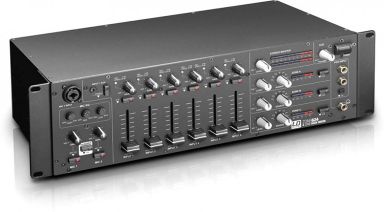

Mixer consoles & mixers
Mixers and Mixing Consoles at LTT – Your Buying Overview
Whether you run live sound on stage, mix a band in the rehearsal room or drive a mobile PA system, the right mixer keeps every signal under control. As your specialist for event technology, LTT gives you a broad selection of analog, digital, powered and DJ mixers for every application.
From compact two-channel desks to large consoles with 32 inputs and more, you will find hardware built for professional use. Combine your mixer with the matching cabling, cases and PA gear from a single source.
Use this overview to understand how a mixer works, which types exist and how to size the channel count to your venue — so you can invest in the optimal solution instead of guessing.
What Is a Mixer and How Does It Work? Fundamentals
A mixer — also called a mixing console, mixing desk or mixer — combines multiple audio signals into one or more output buses. It is the central hub of any sound setup: microphones, instruments and playback devices arrive on separate channels, get level-matched and shaped, and are then summed to a stereo L/R master signal.
The core function
Each input signal reaches its own channel strip, where you adjust volume with a fader, correct the tone with the equalizer and set the position in the stereo image with the pan control. The processed signals are routed to the master bus, which feeds the power amp or the active PA system. In this role the mixer also acts as a preamp before the amplifier.
Distinction from adjacent devices
A mixer is not the same as a USB audio interface. An interface converts audio for a computer but offers little hands-on channel control, while a mixer provides physical faders, EQ and routing for live work. A mixer is also different from a standalone effects unit or a lighting console: those handle only effects processing or DMX light control, whereas the mixer manages the full audio signal flow.
Mixers typically also provide aux sends for separate monitor mixes and effects, PFL (Pre Fade Listen) for monitoring individual channels, and 48V phantom power for condenser microphones. This makes the mixer the reliable centre of live sound and studio production alike.
Types of Mixers: Analog, Digital, Powered and DJ Models
Mixers come in several types and variants, and knowing the differences helps you pick the right model for your work.
Analog mixers
Analog mixers process the signal purely with analog circuitry. Their biggest strength is intuitive operation: one function equals one control, so everything is visible at a glance. They are robust, reliable and often cheaper at low to moderate channel counts — ideal for rehearsal rooms and smaller live setups. The trade-off: settings cannot be saved.
Digital mixers
Digital mixers convert the audio into a digital signal processed by DSP. Controls are organised into layers, so a compact desk can offer a large channel and feature set. The key practical advantage is scene and preset storage: you can prepare complex shows and recall them instantly. Digital desks also offer strong connectivity such as tablet remote control, Dante and USB, plus integrated effects and DSP.
Powered mixers
Powered mixers integrate an amplifier directly into the console. This all-in-one concept saves space and cabling and is popular for mobile events and speakers, bands and smaller venues where a compact, transportable rig matters.
DJ mixers
DJ mixers add a crossfader between channels for smooth blends between turntables or media players. They typically include phono inputs, cue monitoring and beat-oriented controls tailored to club and mobile DJ work.
Hybrid mixers
Hybrid mixers form a third category, combining an analog signal path with digital control, DSP or an integrated USB audio interface. Many models also come as 19-inch rackmixers, built to the 19-inch standard for permanent installation in event racks.
Channel Strip, Connections and Key Controls Explained
The channel strip is the heart of every mixer, and it is usually repeated identically across all channels. Once you master one channel strip, you can operate all the others.
Technical controls on the channel strip
- Gain/Trim: sets the input preamplification so the signal arrives at the right level.
- EQ (equalizer): quick tonal correction directly on the channel.
- Fader: the main control for the channel output level.
- Pan: positions the signal in the stereo image.
- Aux sends: feed separate monitor mixes or effects; the effects return is fed back into the summing bus.
- Mute: silences a channel while keeping all settings intact.
- PFL (Pre Fade Listen): monitor a channel independently of the fader.
- Insert: a patch point, usually behind the preamp, for external dynamics or effects.
Inputs, outputs and connections
A mixer offers a variety of connections. XLR inputs are used for microphones, while Line-In accepts line level sources such as keyboards, playback devices and instruments. Many models provide a USB port so the mixer can double as an audio interface on a PC for recording. A 48V phantom power switch supplies condenser microphones, and dedicated headphone and monitor outputs let you check the mix.
Functional sections and signal flow
A mixer is divided into functional sections: input channels, subgroups, effect returns, the master/summing bus and monitoring. Buses combine multiple signals — for example a subgroup fader that controls the entire drum section at once. Metering prevents clipping and protects your equipment. As a rule the signal follows reading direction: top to bottom and left to right through the desk.
Applications: Which Mixer for Which Use? Band, DJ, Club, Theatre and Mobile Events
The right mixer depends heavily on where and how you use it. As a full-service event-technology specialist, LTT helps you size the mixer to your venue and integrate it into the wider signal chain — from mixer to amplifier to PA system, alongside your lighting and stage setup.
Band and rehearsal room
For a standard band with drums, guitar, bass and vocals, full microphone use quickly reaches twelve channels or more. Choose a model with enough microphone inputs; a 16- or 24-channel desk gives you headroom. For duos or solo artists, compact four-channel mixers with built-in effects are enough.
DJ and club
DJ mixers with a crossfader suit turntable and media-player workflows. In clubs, robust build quality and clean routing matter, and many installations use rackmount 19-inch models integrated into fixed racks.
Theatre and church
Here digital mixers shine: scene storage lets you recall complex settings for each act or service instantly, and remote control from a tablet keeps the operator flexible.
Mobile events
For mobile PA work, powered mixers or compact digital desks keep the rig transport-friendly. For large events, 32+ channel consoles are common.
From the mixer, the signal typically continues into your PA system. Round out your setup with matching speakers, amplifiers and stage monitoring to achieve impressive results in any venue.
Buying Guide: Channel Count, Price Tiers and Beginner vs Pro Advice
Choosing a mixer is easier when you answer three questions first: how many signals do you need, what will you connect, and what is your budget?
Buying criteria and channel count
The number of channels and inputs depends on your application. Count every source — each microphone, instrument and playback device — and add a little headroom, because as a rule the channel count should never be too tight. If you work with microphones, make sure there are enough XLR microphone inputs; for pure line signals from synthesizers or keyboards, line inputs are sufficient. For PC recording, a USB audio interface built into the mixer is essential.
Beginner vs professional advice
Beginners should choose a simple, manageable device. An affordable analog mixer is the ideal starting point to learn the basics without getting lost in endless options. Professionals who need reproducible setups and dense feature sets usually benefit more from digital desks.
Concrete price tiers
The price range is wide, roughly from around €50 to high-end consoles worth as much as a small car.
- Entry (approx. €50–150): compact analog mixers with 4–10 channels, often with basic EQ, compressor and USB.
- Mid (approx. €150–600): 12–24 channel analog and compact digital desks with integrated effects.
- Professional (from approx. €600): large digital consoles with scene recall, extensive DSP and touring-grade build.
A practical tip: define your core needs (channels, routing, in/outputs) first, then your must-have effects, and match the budget last.
Comparison: Analog vs Digital Mixer – The Difference
Deciding between analog and digital is one of the most common questions for touring and installed setups. The comparison below highlights the key differences so you can pick the optimal solution.
How to choose
If you value fast, hands-on control and a limited number of channels, an analog mixer is a robust and cost-effective choice. If you need reproducible settings, many channels in a compact housing and integrated effects, a digital mixer delivers far more control once you have learned it. Hybrid mixers bridge both worlds with an analog path and digital extras such as USB recording.
Rackmount Mixers, Cabling and Accessories for Your Setup
A mixer rarely works alone — the right accessories and connection gear complete your rig and keep it road-ready.
Rackmount and case integration
Many models are available as 19-inch rackmixers, ideal for fixed installations and for building a mobile rack. Combine them with a suitable flightcase or rack to protect the desk during transport and to keep your event rack tidy and standardised.
Cabling and connectors
Around a mixer you will need reliable cabling. Plan for XLR cables for microphones and balanced connections, jack (Klinke) cables for instruments and line sources, and multicore looms when you route many channels to and from the stage. Quality connectors from brands such as Neutrik keep signals clean and connections durable. Remember that condenser microphones require the mixer's 48V phantom power.
Matching equipment
Round out your signal chain with power amplifiers, active or passive PA speakers, stage monitors and microphones. Sourcing mixer, cables and accessories together from one specialist ensures everything fits and works from the first show. Reach out for advice if you are unsure which cable lengths or connector types your setup needs.
Popular Brands and Manufacturers of Mixers at LTT
At LTT you will find high-quality branded products for every budget and application. Well-known mixer manufacturers cover everything from affordable entry models to professional touring consoles.
Among the popular brands in this range are Allen & Heath, Omnitronic, DAP-Audio, LD Systems and Dynacord, complemented by further trusted names such as Alto-Professional, IMG Stageline and DBX for signal processing.
- Allen & Heath: established professional analog and digital consoles for live sound.
- Omnitronic: solid value for DJs, bands and mobile PA users.
- DAP-Audio and LD Systems: versatile mixers for events and installations.
- Dynacord: professional-grade desks for demanding live applications.
All of these manufacturers stand for dependable audio performance. If you are not sure which brand fits your project best, our team is happy to guide you toward the model that matches your channel count, connections and budget.
Care and Maintenance of Your Mixer
Good care keeps your mixer reliable for years of professional use.
Cleaning
Wipe the surface with a dry or slightly damp cloth and avoid aggressive solvents. Dust in faders and potentiometers is a common cause of crackling; use compressed air or a specialised contact cleaner sparingly and only when the device is switched off and disconnected.
Storage and transport
Transport your mixer in a suitable case to protect faders, knobs and connectors from impact. Store it in a dry environment, because moisture can damage the electronics and corrode contacts.
Routine maintenance
Check cables and connectors regularly, keep firmware on digital desks up to date, and back up your scenes and presets so you can restore your setup quickly. These simple habits protect your investment and keep your signal chain dependable on every show.
LTT – Your Specialist for Event Technology
When you buy a mixer or mixing console at LTT, you rely on more than 25 years of experience in event technology and over 100,000 positive customer reviews. As your reliable partner, we do not just sell single products — we help you put your entire sound and stage setup in the spotlight, from the mixer through the amplifier to the PA system.
Your order ships from Bocholt, Germany, with free shipping from €69 and express delivery available on request. We also ship worldwide through our international dealer network and offer wholesale conditions for resellers.
Round out your setup with matching gear from our range of PA speakers and amplifiers, microphones and audio cabling, so every component works together for impressive results. If you have questions about channel count, routing or connections, get in touch — we will help you find the optimal solution for your venue.
FAQ – Questions & Answers
A mixer works by taking multiple audio signals — from microphones, instruments and playback devices — onto separate channels, level-matching and shaping them, and then summing them to one or more output buses. On each channel strip you set the input gain, adjust the tone with the equalizer, position the sound with pan and control volume with the fader. The combined signal is routed to the master bus, which feeds a power amp or active PA system. Aux sends create separate monitor and effects mixes, while PFL lets you monitor individual channels. In short, a mixer is the central hub of any sound setup.
You need a mixer whenever you have to combine and control more than one audio source at the same time — on stage, in the rehearsal room, in a club, theatre or at any event. A mixer lets you balance the volume of a band, feed separate monitor mixes to musicians, add effects and send a clean stereo signal to your PA system. Even a small setup with a couple of microphones and a playback device benefits from a mixer, because it gives you hands-on control over levels and tone. For PC recording, a mixer with a USB audio interface also connects your sources directly to a computer.
A good DJ mixer covers a wide price range depending on features and build quality. Simple two-channel DJ mixers with a crossfader and basic controls start at roughly €50 to €150. Mid-range club-oriented DJ mixers with more inputs, cue monitoring and effects typically sit between €150 and €600. Professional touring and installation-grade DJ mixers can cost well over €600. For most mobile DJs, a solid mid-range model offers the best balance of durability, sound and features. If you are unsure how much to spend, define your channel count and connection needs first, then match the budget to your real requirements.
A DJ mixer blends two or more audio sources — such as turntables or media players — into a single output, letting you transition smoothly between tracks. Its defining feature is the crossfader, which fades between channels, plus per-channel volume faders and EQ for shaping each track. A DJ mixer also provides cue monitoring so you can pre-listen to the next track on headphones before it plays, and it usually offers phono inputs for turntables and a microphone input for talkover. In short, a DJ mixer is the control centre that lets a DJ mix, cue and blend music seamlessly during a set.
There is no single best mixer, because the best choice depends on your application. For live band and PA work, robust consoles from manufacturers such as Allen & Heath and Dynacord are highly regarded. For DJs and mobile events, Omnitronic and other value brands offer reliable performance, while LD Systems and DAP-Audio cover versatile event and installation needs. Digital desks are considered best when you need scene storage and many channels in a compact housing; analog mixers are best when you value simple, hands-on control. The best mixer for you is the one that matches your channel count, connections and budget — our team is happy to advise.
The best mixer for beginners is a simple, manageable analog model with a clear channel strip layout, because one function equals one control and everything stays visible at a glance. A compact analog mixer with four to ten channels, basic EQ, a headphone output and ideally a USB interface is the ideal starting point to learn the fundamentals without getting lost in complex menus. Make sure it has enough microphone inputs with 48V phantom power if you plan to use condenser microphones. Once you are comfortable with the basics, moving up to a larger analog or digital mixer becomes much easier.
When buying a mixer, look first at the number of channels and inputs, which should match your application with a little headroom to spare. Check that there are enough XLR microphone inputs if you work with microphones, or line inputs for keyboards and playback devices. Consider whether you need 48V phantom power for condenser microphones, a USB interface for PC recording, and built-in effects such as reverb, delay and compressor. Think about the EQ section, available aux sends for monitors and effects, and whether a rackmount 19-inch format suits your setup. Finally, match analog versus digital to your workflow and set your budget accordingly.
Choose an analog mixer if you value fast, intuitive operation with one control per function, need only a limited number of channels and want a robust, cost-effective desk — ideal for rehearsal rooms and smaller live PA setups. Choose a digital mixer if you need reproducible settings through scene storage, want many channels in a compact housing, rely on integrated effects and DSP, or require connectivity such as tablet remote control and Dante — perfect for touring, theatre and installations. Digital desks have a steeper learning curve but reward you with far more control. Hybrid mixers combine an analog signal path with digital extras such as USB recording.