Laptop stands
Professional Laptop Stands for Events and Stage Technology
Whether you're a DJ, lighting technician or event professional — a reliable laptop stand is essential for your setup. Professional laptop stands elevate your device to the perfect working height, protect it from vibrations and stage hazards, and ensure optimal visibility during live performances. At LTT, you'll find robust stands designed specifically for the demands of event technology, from compact portable models for mobile DJs to heavy-duty solutions for permanent installations in clubs and theatres.
Unlike consumer-grade office stands, professional event laptop stands are built to withstand the rigours of touring, rapid setup and teardown, and challenging stage environments. They feature reinforced construction, superior stability ratings, and intelligent cable management solutions that keep your workspace tidy and safe. With load capacities ranging from 5 kg to 15 kg, these stands accommodate not just laptops but also MIDI controllers, audio interfaces and other essential equipment.
What Are Laptop Stands and How Do They Work?
A laptop stand is a support structure designed to elevate and position a laptop at an ergonomic viewing angle and height. In the context of event technology, laptop stands serve multiple critical functions beyond simple ergonomics. They provide a stable, vibration-resistant platform for controlling lighting consoles, DJ software, audio processing applications and stage management systems during live performances.
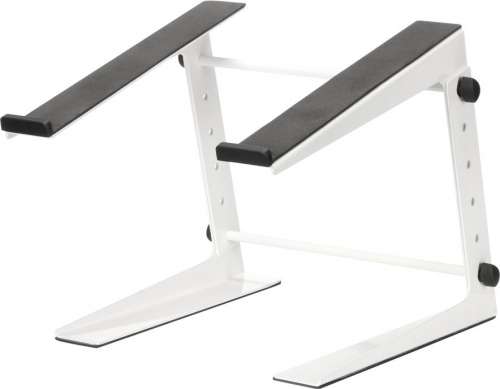
Professional laptop stands typically consist of an aluminium or steel frame with adjustable height settings, ranging from 15 cm to 45 cm elevation. The platform features non-slip rubber pads or clamps to secure the laptop firmly in place, even when positioned at steep angles or in high-traffic stage areas. Many models incorporate ventilation channels or open-frame designs to prevent overheating during extended operation — crucial when running processor-intensive lighting control software or audio production applications for hours at a time.
Compared to simple desk risers or improvised solutions, professional event laptop stands offer superior stability through wider base designs, often with tripod or X-frame configurations that distribute weight effectively. They're engineered to remain steady even when you're operating the laptop's keyboard or touchpad vigorously during a performance. The key difference from office laptop stands lies in portability and durability: event stands fold flat for transport in flight cases, feature quick-release mechanisms for rapid setup, and use materials that can withstand repeated assembly cycles and the occasional knock from passing crew members.
While related products like DJ booths and mixing console tables provide integrated work surfaces, standalone laptop stands offer flexibility to position your control centre exactly where you need it — whether that's beside your CDJs, above your lighting desk, or at the side of the stage for monitor mixing.
Applications: Where Laptop Stands Prove Essential
Laptop stands are indispensable across virtually every event technology scenario. DJs rely on them to position their laptops at eye level beside turntables and CDJs, ensuring they can monitor track waveforms and BPM displays without hunching over. This elevated position also protects expensive equipment from spilled drinks and accidental damage in club environments where space is tight and the crowd is close.
Lighting designers use laptop stands to run DMX control software such as Chamsys MagicQ or Madrix, positioning their screens for optimal visibility while maintaining access to physical lighting consoles. The stands allow technicians to work standing or seated, adapting to the specific requirements of each venue. In theatre productions, laptop stands support QLab playback systems, keeping show control computers secure and accessible throughout performances that may run for hours.
Live sound engineers position laptop stands at front-of-house or monitor positions to run digital mixing software, virtual soundcheck applications, and audio analysis tools. The adjustable height ensures the screen can be viewed comfortably whether the engineer is standing during setup or seated during the show. For corporate events and conferences, laptop stands provide a professional presentation platform for speakers, elevating devices to a comfortable reading height while maintaining a clean, organised stage appearance.
Touring musicians and bands use portable laptop stands to run backing tracks, virtual instruments and effects processing software. The quick-fold designs fit easily into flight cases alongside other gear, and the lightweight aluminium construction keeps transport weight manageable. In houses of worship, laptop stands support presentation software, streaming equipment and audio playback systems, often positioned discreetly at the side of the stage or in technical booths.
Quality Standards and Professional Requirements
When selecting a laptop stand for professional event use, several technical specifications separate adequate products from truly reliable solutions. Load capacity is paramount — while a typical laptop weighs 1.5 kg to 2.5 kg, you need headroom for heavier gaming laptops, additional MIDI controllers placed on the platform, or the occasional accidental lean. Professional stands should support at least 8 kg to 10 kg safely, with premium models rated for 15 kg or more.
Construction material directly impacts both durability and portability. Aluminium stands offer the best strength-to-weight ratio, with 2 mm to 3 mm wall thickness providing excellent rigidity without excessive bulk. Look for anodised finishes that resist scratching and corrosion from sweat and stage fog residue. Steel stands offer superior load capacity and stability but weigh significantly more — typically 3 kg to 5 kg versus 1.5 kg to 2.5 kg for equivalent aluminium models.
Manufacturers such as Riggatec, König & Meyer, and Manfrotto produce stands specifically engineered for event technology applications. These brands incorporate features like cable routing channels, integrated power strip mounts, and compatibility with standard truss clamps for overhead rigging scenarios. Price points range from €35 for basic portable models to €150 for heavy-duty stands with advanced adjustment mechanisms and accessory mounting options.
Stability indicators include base width (minimum 40 cm for floor-standing models), rubber foot diameter (at least 5 cm for effective vibration damping), and the presence of additional bracing struts. Adjustable models should feature positive locking mechanisms — spring-loaded pins or cam locks — rather than simple friction clamps that can slip under load. For touring applications, prioritise stands that fold to less than 60 cm length and weigh under 2.5 kg, ensuring they fit standard equipment cases without consuming excessive space or adding significant transport weight.
Height Adjustment and Ergonomic Positioning
Proper height adjustment transforms a laptop stand from a simple shelf into an ergonomic tool that reduces fatigue during long events. The ideal screen position places the top of your display at or slightly below eye level when you're in your normal working posture — whether standing or seated. For standing operation, this typically means elevating the laptop base to 100 cm to 120 cm above the floor, depending on your height. Seated positions require 60 cm to 80 cm elevation from the floor, or 15 cm to 25 cm above your desk or console surface.
Professional laptop stands offer multiple adjustment mechanisms. Telescoping designs provide continuous height adjustment across a 30 cm to 50 cm range, secured by twist locks or lever clamps. Stepped adjustment systems use pin-and-hole configurations, offering 5 cm to 10 cm increments — less flexible but more stable and quicker to set up in the dark or during rapid changeovers. Some premium models combine both systems, with coarse stepped adjustment for major height changes and fine telescoping adjustment for precise positioning.
Angle adjustment is equally important. A 15-degree to 20-degree tilt brings the screen perpendicular to your line of sight, reducing glare from stage lights and improving readability. Steeper angles (up to 45 degrees) suit scenarios where you're viewing the screen from above, such as when the stand is positioned below your main work surface. Many stands feature tool-free angle adjustment via friction hinges or ratcheting mechanisms, allowing you to reposition the screen between songs or scenes without interrupting the show.
For DJ applications specifically, consider stands that position the laptop slightly behind your mixer or CDJs rather than directly in front. This arrangement keeps your primary controls within easy reach while maintaining screen visibility. Some DJs prefer a 90-degree rotated position with the laptop in portrait orientation, maximising vertical waveform display — ensure your chosen stand's platform is wide enough to accommodate this setup, typically requiring at least 35 cm width to support a 15-inch laptop rotated.
Ergonomic positioning extends beyond the screen itself. Your keyboard should remain accessible without overreaching, and the stand's footprint shouldn't force you into awkward stances to access other equipment. Test your setup during rehearsal to ensure you can comfortably reach all controls throughout an entire set or show duration.
Cable Management and Stage Safety
Professional laptop stands must address cable management — a critical safety and operational concern in live event environments. Loose cables create trip hazards for performers and crew, risk accidental disconnection during critical moments, and present an unprofessional appearance. Quality stands incorporate cable routing solutions that secure power leads, USB connections, audio interfaces and network cables along the stand's structure.
Integrated cable channels or clips run along the stand's vertical supports, guiding cables from the laptop down to floor level in an organised bundle. Some models feature hook-and-loop straps at multiple points, allowing you to secure cable runs at the platform, mid-height, and base positions. This three-point securing method prevents cables from swinging loose if someone brushes past the stand during a performance. Premium stands include cable management arms — articulated channels that follow the stand's adjustment range, maintaining organised routing even when you change the height or angle mid-show.
For touring applications, consider stands with quick-release cable management that allows you to disconnect and pack down in under two minutes. Systems using magnetic clips or snap-open channels enable rapid setup and teardown without threading cables through fixed loops or ties. This speed is essential when you're working tight changeover schedules at festivals or multi-act venues.
Power distribution integration elevates cable management further. Some professional stands incorporate mounting brackets for compact power strips or USB hubs, positioning power sources directly at the laptop platform level. This arrangement minimises the length of cables running across the stage floor and provides convenient access to additional power outlets for charging devices or powering small accessories like MIDI controllers or audio interfaces.
Stage safety standards require all cables crossing walkways to be taped down or covered with cable ramps. By routing your laptop's cables vertically down the stand and then directly to the nearest cable run, you minimise floor-level cable exposure. In permanent installations, consider stands with hollow vertical supports that allow cables to run internally, emerging only at the base where they can be immediately secured to the floor or routed under stage decking.
LTT – Your Specialist for Event Technology
At LTT, we understand the demands of professional event technology because we live it every day. With over 25 years of experience supplying DJs, lighting designers, sound engineers and event professionals, we know exactly what makes a laptop stand reliable enough for touring and versatile enough for any venue. Our range includes portable models for mobile DJs, heavy-duty stands for permanent installations, and everything in between — all from trusted manufacturers who share our commitment to quality.
Every laptop stand in our catalogue is backed by our 3-year LTT warranty, giving you confidence that your investment is protected. We ship from our warehouse in Bocholt, Germany, with free delivery on orders over €69 and express shipping available when you need gear urgently for an upcoming show. Whether you're building your first mobile DJ setup or specifying equipment for a major venue installation, our team provides expert advice to ensure you choose the optimal solution for your specific requirements.
Browse our full range of event technology solutions to create a complete professional setup. From truss systems and rigging hardware to lighting effects and audio equipment, LTT is your single-source partner for innovative solutions that deliver impressive results on stage.
FAQ – Questions & Answers
Standing laptop stands are excellent for event technology applications, particularly for DJs, lighting technicians and live sound engineers who need to move between seated and standing positions throughout a show. Standing operation improves visibility across the venue, allows you to monitor audience response more effectively, and reduces fatigue during long events by enabling posture changes. Professional standing laptop stands designed for event use feature wider bases for stability, height adjustment ranges from 80 cm to 130 cm, and robust construction that remains steady even when you're operating controls vigorously. The key is selecting a stand with adequate load capacity (minimum 8 kg) and a base width of at least 40 cm to prevent tipping. For touring professionals, standing operation also facilitates quicker setup and pack-down compared to seated arrangements that require separate chairs or stools.
The ideal height for a laptop stand in a DJ booth positions the screen at eye level when you're standing in your normal mixing posture, typically 100 cm to 120 cm from the floor depending on your height. This elevation allows you to monitor track waveforms, BPM displays and cue points without hunching over, reducing neck and shoulder strain during long sets. The laptop should be positioned slightly behind or beside your mixer and CDJs rather than directly in front, keeping your primary controls within easy reach while maintaining screen visibility. Many DJs prefer to elevate the laptop 10 cm to 15 cm above their mixer surface, creating a tiered arrangement that provides clear sight lines to all equipment. Adjustable stands offer the flexibility to fine-tune this height based on your specific setup, the booth's configuration, and whether you prefer to mix standing or seated. For optimal ergonomics, the top of your laptop screen should align with or sit just below your natural eye level.
Professional laptop stands designed for event technology can accommodate MIDI controllers and audio interfaces alongside your laptop, provided you select a model with adequate platform size and load capacity. Standard laptop stand platforms measure 25 cm × 30 cm, sufficient for a laptop alone, but you'll need a larger platform (35 cm × 40 cm or more) to support additional equipment. Check the stand's load rating — while a laptop typically weighs 2 kg, adding a MIDI controller and audio interface can bring total weight to 5 kg to 8 kg, requiring a stand rated for at least 10 kg to maintain a safety margin. Some manufacturers offer dual-tier stands with separate platforms for laptop and controllers, or extended platforms with integrated equipment rails. Alternatively, position your MIDI controller on your main work surface and use the laptop stand purely for screen elevation, connecting devices via USB hubs. This arrangement often provides better ergonomics, keeping your most frequently used controls at optimal hand height while elevating the screen to eye level.
Professional event laptop stands differ fundamentally from office models in construction, portability and feature set. Event stands use aluminium or steel frames with 2 mm to 3 mm wall thickness, providing rigidity that withstands repeated setup and teardown cycles, transport in flight cases, and the occasional knock from crew or equipment. Office stands typically use thinner materials (1 mm to 1.5 mm) or plastic components adequate for stationary use but prone to failure under touring conditions. Event stands fold flat to 50 cm to 60 cm length and weigh 1.5 kg to 2.5 kg for easy transport, whereas office stands often don't fold or are too bulky for standard equipment cases. Professional models incorporate cable management channels, compatibility with truss clamps for overhead rigging, and non-slip rubber feet sized for stage use (5 cm diameter or larger). Load capacity is higher — 8 kg to 15 kg versus 3 kg to 5 kg for office models — essential when supporting heavy gaming laptops or additional equipment. Finally, event stands feature quick-adjustment mechanisms (spring pins, cam locks) for rapid setup in low-light conditions, while office stands use slower screw adjustments suitable for infrequent repositioning.
Preventing laptop overheating during extended events requires attention to stand design, positioning and laptop configuration. Choose a laptop stand with an open-frame or ventilated platform design that allows air to circulate freely around your laptop's base and intake vents, typically located on the bottom and sides. Solid platforms trap heat, whereas designs with mesh surfaces or wide ventilation slots promote cooling. Position the stand away from heat sources such as amplifiers, power distribution units and stage lights, maintaining at least 30 cm clearance. Elevating the laptop 15 cm to 20 cm above your work surface improves airflow compared to laying it flat. Angle the stand to 10 degrees to 15 degrees, which helps hot air rise away from the device rather than pooling underneath. Before the event, clean your laptop's cooling vents and consider using compressed air to remove dust from internal fans. Close unnecessary applications to reduce processor load, lower screen brightness, and disable visual effects in your operating system. For critical applications, use an external USB cooling pad positioned beneath the laptop, or invest in a laptop model with superior thermal management designed for sustained high-performance operation.
Aluminium is the optimal material for touring professionals, offering the best combination of strength, weight and durability. Anodised aluminium stands with 2 mm to 3 mm wall thickness provide excellent rigidity while weighing just 1.5 kg to 2.5 kg, making them easy to transport in flight cases without consuming excessive weight allowances. The anodised finish resists scratching, corrosion from sweat and stage fog residue, and maintains appearance despite repeated handling. Steel stands offer superior load capacity and absolute stability but weigh 3 kg to 5 kg, which becomes significant when you're carrying multiple stands or working within strict baggage limits for air travel. Steel is preferable for permanent installations where weight isn't a concern and maximum stability is required. Avoid stands with plastic components — joints, adjustment knobs or platform surfaces — as these crack under repeated stress and temperature fluctuations experienced during transport and storage. Carbon fibre stands exist at the premium end, offering aluminium-level strength at 30 per cent less weight, but cost significantly more (€200 to €300 versus €50 to €150 for aluminium). For most touring professionals, quality aluminium stands from manufacturers such as Riggatec, König & Meyer or Manfrotto provide the ideal balance of performance, durability and value.
Professional laptop stands for event technology range from €35 to €150 depending on construction quality, adjustment features and brand. Basic portable models suitable for mobile DJs and small venue work cost €35 to €60, featuring simple height adjustment, aluminium construction and 8 kg load capacity. These stands fold flat for transport and provide reliable performance for occasional use. Mid-range stands priced €60 to €100 offer enhanced stability through wider bases, tool-free adjustment mechanisms, integrated cable management and higher load ratings (10 kg to 12 kg). These models suit regular touring use and provide features such as quick-release folding and accessory mounting options. Premium stands from specialist manufacturers such as König & Meyer, Manfrotto or Riggatec cost €100 to €150, incorporating heavy-duty construction (15 kg load capacity), advanced adjustment systems with both coarse and fine positioning, superior cable management solutions, and compatibility with professional rigging hardware. For permanent installations in clubs, theatres or houses of worship, consider investing in premium models that will withstand years of daily use. Touring professionals should budget for mid-range to premium stands that can endure the rigours of repeated transport and setup cycles.
For DJ applications, select a laptop stand with a minimum 8 kg load capacity, height adjustment from 80 cm to 120 cm, and a platform size of at least 30 cm × 35 cm to accommodate laptops up to 17 inches. Prioritise models with quick-adjustment mechanisms (spring pins or cam locks) that allow you to change height rapidly between sets without tools. The stand should fold to less than 60 cm length for transport in standard DJ equipment cases. Look for integrated cable management features — clips or channels that secure your laptop's power lead, USB connections to audio interfaces, and any MIDI controller cables running to your setup. A 15-degree to 20-degree angle adjustment capability improves screen visibility under stage lighting and reduces glare. Aluminium construction keeps weight manageable (under 2.5 kg) while providing adequate stability through a base width of at least 40 cm. Rubber feet with 5 cm diameter or larger prevent the stand from sliding on smooth DJ booth surfaces and dampen vibrations from bass-heavy music. Brands such as Riggatec, König & Meyer and Manfrotto offer models specifically designed for DJ use, typically priced €50 to €100. Test the stand's stability by simulating vigorous keyboard operation — it should remain steady without rocking or flexing.